One prompt for the whole build
Paste this into Claude Code, Cursor or any coding assistant, with your one-sentence game idea in it. It works in steps and stops with numbers you can check. The eight steps below show each part, with a prompt of its own.
Make a small browser game in three.js r170 that I can submit to web game portals (CrazyGames and Playgama).
Game: <one sentence, e.g. "arena: the knight punches waves of zombies, each wave a bit faster, 3 lives, best score saved">.
Models: only the free CC0 GLB files listed in https://models.popyca.com/guides/web-portals/agent.md, with their real clip names.
Rules:
1. Gameplay starts within one click of the page opening. Teach the controls by playing, no text walls.
2. Keyboard + mouse and touch (on-screen joystick and buttons) from the start. Never use the Esc key.
3. Everything ships in the build: three.js bundled with Vite, no CDN, no web fonts from other hosts, relative paths only.
4. All portal calls go through portal.js (copy it unchanged from the agent.md). Saves only through portal.save / portal.load, never localStorage.
5. Ads only at natural pauses (wave end, game over). At most one optional "watch an ad: revive" per run, hidden when portal.canReward() is false.
6. Budget: initial download under 5 MB, first playable frame under 5 s on a mid-range phone.
Work in steps: core loop, controls, portal.js, first 60 seconds, build size, two zips. After each step run the game and tell me: build size, time to first frame, fps with a 4x CPU slowdown, console errors, and what you could not test.
The free files
16 CC0 models: 8 blocky characters, 3 animals, 5 toy cars. GLB, rigged where it matters. Commercial use fine, no credit needed.
Or let your assistant fetch them from GitHub: every URL is in agent.md.
Portal fit, in one look
Pick a game portals reward
Portals rank games by how long people play and whether they come back, so pick one verb, short runs and a reason for one more round. Small and finished beats big and promising.
I want to make my first web portal game in about two weeks. Suggest 5 ideas that fit portals: one core verb, sessions of 3 to 10 minutes, playable with a keyboard and with one thumb, a clear reason to play one more round, progress worth saving.
Use only these free models: 8 blocky characters (hero, knight, wizard, pirate, astronaut, robot, zombie, princess; clips idle, walk, run, jump, fall, wave, punch, death, cheer, dance), cat, fox, owl (12 clips each) and 5 toy cars.
For each idea: a 30-second pitch, what happens in the first 60 seconds, what an optional rewarded ad would give, and the biggest risk. Then pick one and say why.
Rules, sources and whyfull text
Both portals tell you what they measure. CrazyGames moves a game from its test phase to a full release on four numbers: average playtime, day-1 retention, conversion to gameplay and, for games that start Basic Launch on or after 23 November 2026, thumbnail click-through rate [CrazyGames]. Playgama's own guidance asks for clear goals, early wins and "at least 10 minutes of distinct gameplay before the game starts repeating itself" [Playgama].
That rules a lot out before you write a line. A game that needs a lobby of other players, a story that takes five minutes to start, or a big world to explore loses the first minute, and the first minute is what the numbers see. A game with one verb you learn in ten seconds and master over ten minutes keeps it.
What both portals will not take
- Copies and brands. Playgama refuses games that copy another game in its catalogue, duplicate one of your own games, or use other people's names, logos, music or characters [Playgama]. CrazyGames asks that names, assets and content "exhibit originality" [CrazyGames].
- Real money. No gambling, lotteries or real-world prizes [Playgama]. CrazyGames requires PEGI 12 content [CrazyGames].
- Many small variations. CrazyGames lets you resubmit only "if you've made clear improvements" [CrazyGames], and a game whose test metrics fall short can only come back as a new game with significant improvements [CrazyGames]. Sending ten quick reskins is how an account gets a reputation, not a hit.
Free CC0, rigged and animated
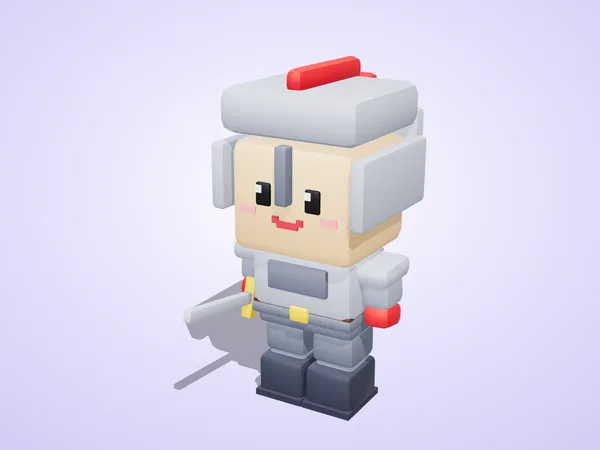
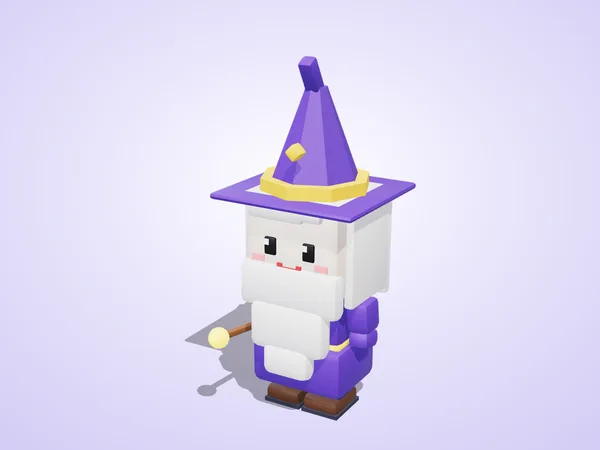
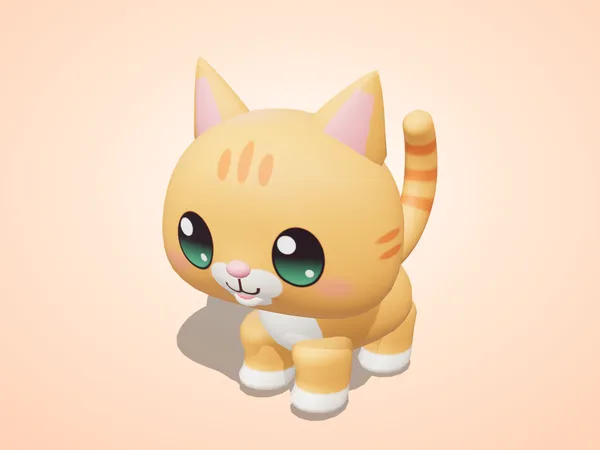
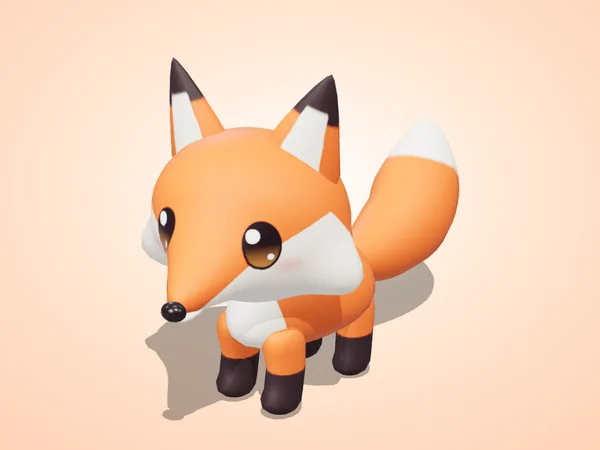
Four of the 16 free files. Renders from this site.
Get the free models
16 free CC0 GLB files: eight blocky characters on one rig with 10 clips, a cat, a fox and an owl with 12 clips each, and five toy cars. Commercial use is fine, no credit needed.
Download the free GLB files listed in https://models.popyca.com/guides/web-portals/agent.md that my game needs into ./public/models.
For each file print its size in KB, triangle count and animation clip names.
Then bake each one: npx @gltf-transform/cli optimize in.glb out.glb --compress meshopt --texture-compress webp
and print the size before and after. Keep the originals.
8 Free Blocky Characters · Cute Pets FREE · 5 Free Toy Cars · store props (other guide)
Rules, sources and whyfull text
The same files are on GitHub, so a coding assistant can fetch them by URL; the list with sizes is in agent.md. Repos: characters, animals, toy cars. If your game is a shop or a room, the walkable store guide uses six free store props.
| Free set | Files | What you get |
|---|---|---|
| Blocky characters | 8 GLB | hero, knight, wizard, pirate, astronaut, robot, zombie, princess; one 22-bone rig; idle, walk, run, jump, fall, wave, punch, death, cheer, dance |
| Pets | 3 GLB | cat, fox, owl; 12 clips each (idle, walk, run, jump, eat, sit, sleep, attack, hit, death and two more); a lighter mobile mesh inside each file |
| Toy cars | 5 GLB | muscle car, monster truck, police car, ice cream van, fire truck; separate wheels |
Bake them before you ship. We ran the command from the prompt on the free knight and zombie: 410 KB became 171 KB and 344 KB became 161 KB, and all ten clips still played in three.js r170. The clip at the top of this page is that test.
A note on AI and art. Playgama accepts AI-generated assets but not games built entirely from them, and says AI-generated games currently perform "more than 2x worse on metrics" than titles made without AI graphics [Playgama]. That is the platform's own statement, not our measurement. Hand-made models with a consistent style are one way to stay clear of it; your own art direction on top is the other.
The knight's clips. Idle, walk and run are in the free copy; the sword slash is from the paid pack.
Build the core loop with Claude
Ask for the core loop first: move, act, fail, try again. No menus, no shop, no settings until the loop is fun for two minutes. Vite + three.js from npm, so nothing loads from a CDN.
Set up a Vite + three.js r170 project (installed from npm, no CDN). Load knight.glb and zombie.glb with GLTFLoader + MeshoptDecoder; clone zombies with SkeletonUtils.clone so they animate on their own.
Build only the core loop: the knight moves on a round arena (WASD or arrows; a touch joystick on the left half of the screen), punches with Space or a big button on the right, zombies walk in from the edge, one punch knocks a zombie down (death clip), a touch costs one of 3 lives, each wave is a little faster. Score and best score. No menus yet.
Run it and report fps and console errors.
Rules, sources and whyfull text
Claude Code (or any coding assistant) is good at the plumbing of a three.js game: the loader, the animation mixer, input for keyboard and touch, collisions on a flat arena, a wave timer. It is not good at knowing whether the game is fun. Play every build yourself, on a phone too, and give it short, concrete feedback ("zombies reach me before I can see them", not "make it better").
Three rules that save a rewrite
- Bundle three.js. Playgama requires that the game "loads no external resources" and ships everything in the archive [Playgama]. A CDN import map works on your laptop and fails review. Install three from npm and build with Vite. (The two portal SDK scripts are the exception: the portals tell you to load those from their own URLs [CrazyGames] [Playgama].)
- Relative paths. CrazyGames allows relative paths only [CrazyGames]; set
base: './'in the Vite config. - Real sound. Playgama does not accept sound synthesized in code, "such as procedural Web Audio tones generated by an AI coding agent"; it wants recorded or produced audio files, music and a mute button [Playgama]. Plan an afternoon for sound.
What we measured. three.js r170 with GLTFLoader, the meshopt decoder and SkeletonUtils, minified with esbuild: 756 KB, 195 KB gzipped, 160 KB with Brotli. Add the two baked characters and the whole first scene is about half a megabyte over the wire.
One run, and every portal call in it
- Page opens, SDK first
await portal.init() - Assets load
portal.loading(true / false) - First playable frame
portal.ready(); portal.play() - Wave 1, 2, 3 …
no ads during play - Wave ends: natural pause
portal.stop(); await portal.breakAd() - Game over: optional revive
if (portal.canReward()) portal.rewardAd() - New best score
portal.save('best', n)
Add the portal SDK through one file
The game never calls an SDK directly. One small file, portal.js, speaks to the CrazyGames SDK or the Playgama Bridge and falls back to "no ads" anywhere else. Ads only at natural pauses.
Add portal.js from https://models.popyca.com/guides/web-portals/agent.md unchanged, then wire it:
- await portal.init({ audio, pause }) before loading the models; audio(false) must mute every game sound, pause(true) must freeze the game loop and timers.
- portal.loading(true) / portal.loading(false) around loading; portal.ready() and portal.play() when the first frame with the knight is on screen.
- At every wave end and at game over: portal.stop(), await portal.breakAd(), then portal.play() when play resumes.
- On the game-over screen only, and only once per run: a "Watch an ad: revive" button, shown only if portal.canReward() is true, with an equally large "No thanks". Revive only when portal.rewardAd() resolves true.
- Save the best score with portal.save('best', n) and read it at start with portal.load('best').
Rules, sources and whyfull text
Both portals require their SDK for a full release. CrazyGames needs it for Full Launch (it is optional, with ads switched off, during Basic Launch) [CrazyGames]; Playgama makes the Bridge "a mandatory condition for uploading a game" [Playgama]. The calls are different, the rules are close:
| CrazyGames SDK v3 | Playgama Bridge | |
|---|---|---|
| Start | await SDK.init() | await bridge.initialize(), before the game loads |
| Play is on screen | game.gameplayStart() / gameplayStop() at every break [CrazyGames] | platform.sendMessage('game_ready') at the first playable frame [Playgama] |
| Break ad | ad.requestAd('midgame', callbacks) | advertisement.showInterstitial(); the Bridge spaces them out |
| Rewarded ad | ad.requestAd('rewarded', callbacks); reward in adFinished, never on adError [CrazyGames] | advertisement.showRewarded(); reward on state rewarded |
| Saves | Data module, 1 MB limit [CrazyGames] | bridge.storage; localStorage, cookies and IndexedDB are not allowed [Playgama] |
| Sound | mute when the ad starts, not when it is requested [CrazyGames] | start muted if platform.isAudioEnabled is false; follow audio and pause events |
The ad rules, in short
- No ads before the player has had "a reasonable amount of gameplay", never during play, never chained [CrazyGames]. Playgama: only at logical pauses, and the Bridge "holds back the first one" [Playgama].
- Rewarded ads are opt-in, the button says that an ad will play and what it gives, the "no" option is just as visible, and a revive is offered at most once per attempt [Playgama] [CrazyGames].
- If an ad fails or an ad blocker is on, the game carries on normally; players with ad blockers may not be blocked [CrazyGames].
- During CrazyGames Basic Launch ads are off, so a rewarded button that does nothing must not be shown;
portal.canReward()is where that goes [CrazyGames].
portal.js (99 lines; the ad part below)
We ran this file on 127.0.0.1 in three modes on 13 November 2026: without an SDK, with the CrazyGames SDK v3 in its local test mode (break ad, rewarded ad and data module all answered, sound and pause toggled around each ad) and with the Playgama Bridge, which uses a mock platform outside a portal. It has not been through either portal's review; test it in their preview and QA tools before you submit.
  // natural pauses only (level end, game over). The SDKs decide whether an ad really shows.
  // CrazyGames: resolves after the ad or right away when none is served. Playgama: resolves at once;
  // if an ad opens, the state events above pause and mute the game until it closes.
  breakAd() {
    return new Promise((done) => {
      if (kind === 'crazygames') {
        CG().ad.requestAd('midgame', { adStarted: adOpen, adFinished: () => { adShut(); done(); }, adError: () => { adShut(); done(); } });
      } else {
        if (kind === 'playgama') PG().advertisement.showInterstitial();
        done();
      }
    });
  },

  // only show the "Watch an ad: revive" button when this is true
  canReward() { return kind === 'crazygames' || (kind === 'playgama' && PG().advertisement.isRewardedSupported); },
  // resolves true only when the ad was watched to the end: grant the reward then, never on an error
  rewardAd() {
    return new Promise((done) => {
      if (kind === 'crazygames') {
        CG().ad.requestAd('rewarded', { adStarted: adOpen, adFinished: () => { adShut(); done(true); }, adError: () => { adShut(); done(false); } });
      } else if (kind === 'playgama') {
        rewardGot = false; rewardDone = done;
        PG().advertisement.showRewarded();
      } else done(false);
    });
  },
Download the whole portal.js (init, language, loading, saves) or copy it from agent.md.
One Playgama detail that cost us a console error: the Bridge loads playgama-bridge-config.json from next to index.html and logs an error without it. An empty {} was enough for the test; the docs have a config editor for real placements.
Playgama's docs also say a game with the Bridge can be uploaded to CrazyGames directly [Playgama]. We use two builds with the portals' own scripts instead, because each portal's own SDK is what its review checks.
The first minute, with the portal numbers
Win the first 60 seconds
Most players decide in the first minute. Land them in play within one click, teach by doing, give the first reward in seconds. No ad, sign-in or settings screen before the first wave.
Play the first 60 seconds as a new player and list every second that is not play. Then fix them:
- open straight into wave 1 (no title screen; at most one Play button),
- show the controls for this device next to the knight (keys on desktop, a finger on the joystick on touch) until the first move,
- wave 1 cannot be lost in the first 20 seconds,
- the first reward (score pop, cheer clip) comes within 15 seconds,
- no ad, sign-in or settings screen before the first wave.
Rules, sources and whyfull text
CrazyGames asks that games "land new users in gameplay immediately", with "a maximum of 1 click" if that is not possible [CrazyGames]; its conversion metric is the share of players who play "for at least one minute after starting the game", and top titles convert 80% or more [CrazyGames]. Playgama gives the same advice in more words: one click from the loading screen at most, ideally zero; no name, sign-in or options before playing; teach the core mechanic "in the first 30 to 60 seconds through play" [Playgama].
- Controls where the thumb is. Show the hint next to the player character or on the joystick, for the current device: keys on desktop, a finger on touch. Hide it after the first move.
- An early win. The first wave should be hard to lose. A score pop and the cheer clip within the first 15 seconds tell the player the game is working.
- Language. English is required on both portals; take the player's language from the SDK (
portal.language()) if you translate [CrazyGames] [Playgama]. - Save at once. A returning player who lands in a tutorial again is a lost day-1 retention point. Save after every meaningful step through
portal.save.
From our store guide: the same scene raw (2.68 MB) and baked (620 KB).
Keep it small and fast
Size is the first metric players feel. Playgama suggests under about 5 MB before the first playable frame; CrazyGames reports top titles under 20 MB that load in under 10 seconds.
Run npm run build and report: total size of dist, what loads before the first frame, number of files, the 5 largest files.
Targets: initial download under 5 MB, fewer than 1,500 files, no request to any other host (check the network panel), no localStorage calls.
Then test in Chrome DevTools with a 4x CPU slowdown and "Fast 4G": time to first frame and fps. Fix the worst item first and measure again.
Rules, sources and whyfull text
| Limit | CrazyGames | Playgama |
|---|---|---|
| Initial download | ≤ 50 MB; ≤ 20 MB to appear on the mobile homepage [CrazyGames] | guideline about 5 MB, first playable frame under about 5 s, never over 10 s [Playgama] |
| Total size | ≤ 250 MB, ≤ 1,500 files [CrazyGames] | ≤ 300 MB archive; peak memory under 2 GB while starting [Playgama] |
| Time to play | ≤ 20 s checked in QA for externally hosted files [CrazyGames]; top titles load in under 10 s [CrazyGames] | see above |
| Browsers | Chrome and Edge expected; poor Safari support gets the game disabled there [CrazyGames] | current Chrome, Firefox, Opera, Safari and Edge on Windows, macOS, Android and iOS [Playgama] |
CrazyGames measures load time and size up to the first gameplayStart call [CrazyGames], so whatever the first scene does not need should load after it. For a three.js game that means: bake every GLB (step 2), compress textures to WebP, load later levels and music in the background once play has started, and keep the device pixel ratio at 2 or lower on phones.
Test the slow case, not your desktop: Chrome DevTools with a 4x CPU slowdown and a throttled network is a cheap first check. It is not a real phone; try one before you submit.
Before you press submit
- index.html at the zip root, relative paths, no other hosts
- Plays with keyboard and with touch, no Esc key
- No ad before real play; rewarded button only where allowed
- Game still works when an ad fails or is blocked
- Music and sound are real audio files, with a mute button
- Title in the game = title in the form
- Your own name, art direction and UI, no emoji icons
Submit, one portal at a time
CrazyGames: a test phase with ads off, then a full release only if the numbers hold. Playgama: moderation in a few business days, then its own site and partner platforms.
Make two builds from the same code:
- dist-crazygames: <script src="https://sdk.crazygames.com/crazygames-sdk-v3.js"></script> before the game script.
- dist-playgama: <script src="https://bridge.playgama.com/v2/stable/playgama-bridge.js"></script> before the game script, and playgama-bridge-config.json next to index.html.
Zip each with index.html at the root and relative paths only. Then write the store text from the build, not from wishes: a 2 to 4 word title that matches the in-game title, a two-sentence description, how to play (keyboard and touch), supported devices and orientation. Do not list a feature the build does not have.
Rules, sources and whyfull text
CrazyGames
You upload in the developer portal and can test in their preview tool first [CrazyGames]. Every game then starts with Basic Launch: a limited audience for 7 to 21 days, with video ads, banners and in-game purchases switched off. It ends once the game has been live 7 days with at least 500 plays, or after 21 days. If all metrics meet the benchmarks, you are invited to add the full SDK integration and submit for Full Launch: global release with monetization and a revenue share. If some do, you may be invited to improve and try again; if most do not, the game cannot proceed [CrazyGames]. New games may appear in a new-games carousel on the homepage; after that, placement "depends on ongoing performance" [CrazyGames].
Playgama
You upload a ZIP with index.html at the root in the developer account, fill in title, description, how to play, devices, orientation and languages, test in their QA tool and submit [Playgama]. Moderation "usually takes 3-5 business days" on Playgama; partner platforms can take up to 2 weeks [Playgama]. The Bridge targets many platforms at once; the docs list, among others, MSN, Facebook, YouTube, Discord, Huawei, Xiaomi, Samsung and Yandex Games [Playgama], and Playgama says it reaches "450+ million users monthly" [Playgama] (its own figure).
Both at once?
Possible: CrazyGames says publishing elsewhere does not affect revenue share eligibility as long as you hold the distribution rights [CrazyGames], and Playgama accepts games published on other platforms [Playgama]. CrazyGames' 2023 developer terms also describe an optional 50% higher compensation for two months of exclusivity on browser game sites, with the full ad SDK [CrazyGames terms 2023]; check the current terms in the portal before you count on it. A simple order: one portal first, learn from its numbers, then the other.
What strong games reach in Basic Launch (CrazyGames)
Benchmarks from the CrazyGames docs; bars are only a visual scale.
Read the numbers, change one thing
Basic Launch gives you four numbers. Fix the weakest one with the smallest change that could move it, ship, and measure again. Do not rebuild the game around a guess.
Here are my Basic Launch numbers: average playtime X min, day-1 retention Y %, conversion to gameplay Z %, thumbnail CTR W %.
Compare them with the CrazyGames benchmarks in https://models.popyca.com/guides/web-portals/agent.md. Name the single weakest metric and propose three changes that target only that metric, smallest first. Change nothing else.
Rules, sources and whyfull text
The benchmarks above are from CrazyGames' own page on Basic Launch metrics, which also gives the definitions: average playtime per session, the share of players who return the day after their first session, the share who play at least one minute, and the share who click the thumbnail after seeing it [CrazyGames]. Their tips, condensed: a satisfying core loop and gradual difficulty for playtime; levels, unlocks and saved progress for retention; a small build and no long intro for conversion; one clear focal point, a bold title, an honest cover and a 15 to 20 second preview video for CTR.
Playgama sends reports on time spent, retention and revenue [Playgama], and offers an analytics module in the Bridge for your own events [Playgama]. Send "level started", "level completed" and "level failed" with the level number, and the drop-off point is usually obvious.
What usually moves each number, in our experience making browser games: playtime moves with a second layer of goals (unlocks, a best score to beat); retention with saved progress and a daily reason to return; conversion with the first ten seconds; CTR with the cover. None of these is a promise, and most first games miss at least one benchmark.
What it pays, from the sources
Web portals pay a share of the ad revenue your game brings in, plus in-game purchases where they are allowed. What the share is, and what your game brings in, are two different questions; only the first has public answers.
| CrazyGames | Playgama | |
|---|---|---|
| First weeks | no ads and no revenue during Basic Launch [CrazyGames] | ads through the Bridge once the game passes moderation [Playgama] |
| Share | not published in the docs; the 2023 terms base it on the game's traffic and ad impressions, +50% for two months of exclusivity [CrazyGames terms 2023] | partner platforms: 70% of monthly net revenue up to $1,000, 80% from $1,000 to $3,000, 90% above; Playgama's own site and iframe network: a fixed 50% [Playgama] |
| Purchases | invite-only, through Xsolla [CrazyGames] | selected games [Playgama] |
| Payout | monthly, from €100 [CrazyGames] | withdraw from $100 [Playgama] |
What a game earns
- Portal docsCrazyGames: "Earnings vary depending on how your game performs", with engagement, retention, popularity and advertiser demand as the factors [CrazyGames]. Playgama: "It all depends on the game's popularity on the portals" [Playgama].
- Portal claimsCrazyGames: over 50 million monthly players [CrazyGames]. Playgama: 450+ million users a month across its network [Playgama]. Audience size is not your audience: a game gets the traffic its metrics earn.
- EstimateOne developer who shipped a three.js game built with Claude Code on CrazyGames modelled $1 to $15 per 1,000 sessions from his own assumptions about ads per session and ad rates, so 1 to 15 million sessions for $15,000. At the time of writing his game had earned $0, because it was still in Basic Launch [Roessell 2026]. A model, not a result.
Our view, without our numbers. We publish browser games ourselves and we are not putting our own revenue on this page. What we can say from the industry as a whole: traffic on portals is concentrated on the games with the best metrics, most new games get a short new-games window and little after it, and the games that do well tend to be simple, polished and updated. Treat a first game as the cost of learning the loop, not as income.
Why games bounce
- Mass or low-effort submissionsReskins, near-duplicates of your own games, games built entirely from generative AI [Playgama]. Resubmitting needs "clear improvements" [CrazyGames].
- Ads in the wrong placeBefore real play, during play, chained, or a rewarded button that does nothing [CrazyGames] [Playgama].
- Outside requestsA CDN, Google Fonts or analytics from another host; Playgama wants everything in the archive and no external analytics [Playgama].
- Code-made soundProcedural Web Audio beeps instead of real audio files and music [Playgama].
- Generated-looking UIEmoji in place of icons, a default template look [Playgama].
- Mobile breakageText selection on long press, page scrolling, elements cut off in a square window, no touch controls [Playgama].
For your AI
This page also exists as plain text: the steps, the 16 free file URLs, portal.js, the portal rules with their sources, and the licence. Give your assistant one line:
Read https://models.popyca.com/guides/web-portals/agent.md and help me build the game it describes in this folder. Stop after each step and show me the numbers.
FAQ, licence and sources
Not affiliated. Vuena is not affiliated with, endorsed by or sponsored by CrazyGames or Playgama. Portal rules change; their docs are the final word. Facts here were read on 13 November 2026.
FAQ and licence6 questions
Questions
How much can a web portal game earn?
Nobody can tell you in advance. Earnings depend on plays, playtime and advertiser demand, and portal traffic goes mostly to the games with the best metrics. Most games earn little; a few earn well. Neither portal promises an amount.
Can I publish the same game on CrazyGames and Playgama?
Yes, as far as their docs say: CrazyGames says publishing elsewhere does not affect revenue share eligibility if you hold the distribution rights, and Playgama accepts games already published elsewhere. CrazyGames' 2023 terms describe a higher share for two months of exclusivity, so check the current terms before you decide.
Do portals accept games made with AI?
Playgama accepts AI help for code, story and logic, and AI-generated assets in part, but not games built entirely from generative AI, and it rejects emoji icons and default generated-looking interfaces. CrazyGames asks for original names, assets and content. Your own design and art direction matter more than the tool.
Why are there no ads in my CrazyGames game at first?
Ads, banners and in-game purchases are switched off during Basic Launch. Monetization starts only after a game is selected for Full Launch and has the full SDK integration.
Can I use the free Vuena models in a commercial game?
Yes. The free files are CC0 1.0: commercial use, no credit and no permission needed.
Is Vuena connected to CrazyGames or Playgama?
No. Vuena is not affiliated with, endorsed by or sponsored by CrazyGames or Playgama. Their names are used only to describe where games can be published. Their rules change; their own docs are the final word.
Licence
The free models are CC0 1.0: commercial use fine, no credit, no permission needed. portal.js and the prompts on this page are yours to copy and use, no credit needed. The knight clip in step 3 shows one paid-pack animation (sword slash) and says so. The models are made with our own procedural Blender code, written with AI help; the meshes and textures are not AI-generated. This page was written with AI help and checked against the sources below; the test scene and the sizes were measured by us.
Sources (read 13 November 2026)
- CrazyGames docs: launching
- CrazyGames docs: requirements
- CrazyGames docs: technical requirements
- CrazyGames docs: gameplay requirements
- CrazyGames docs: ad requirements
- CrazyGames docs: Basic Launch metrics
- CrazyGames docs: getting to the first frame
- CrazyGames docs: HTML5 SDK
- CrazyGames docs: game module
- CrazyGames docs: video ads
- CrazyGames docs: data module
- CrazyGames docs: in-game purchases
- CrazyGames docs: payouts
- CrazyGames docs: FAQ
- CrazyGames developer terms (PDF, April 2023)
- Playgama docs: overview
- Playgama docs: Bridge setup
- Playgama docs: platform API
- Playgama docs: technical requirements
- Playgama docs: advertising requirements
- Playgama docs: user experience requirements
- Playgama docs: content requirements
- Playgama docs: loading and first session
- Playgama docs: ads best practices
- Playgama docs: submitting a game
- Playgama docs: moderation FAQ
- Playgama docs: payments FAQ
- Playgama: for developers
- F. Roessell, "$15,000 from one browser game: the math" (Substack, 19 Oct 2026)
Start free: 8 free blocky characters · free pets · all guides