- What you build
- The brief to Claude
- Layout as data
- Placing in Blender
- Baking for the web
- three.js starter
- What broke
- Limits and FAQ
What you build, and with what
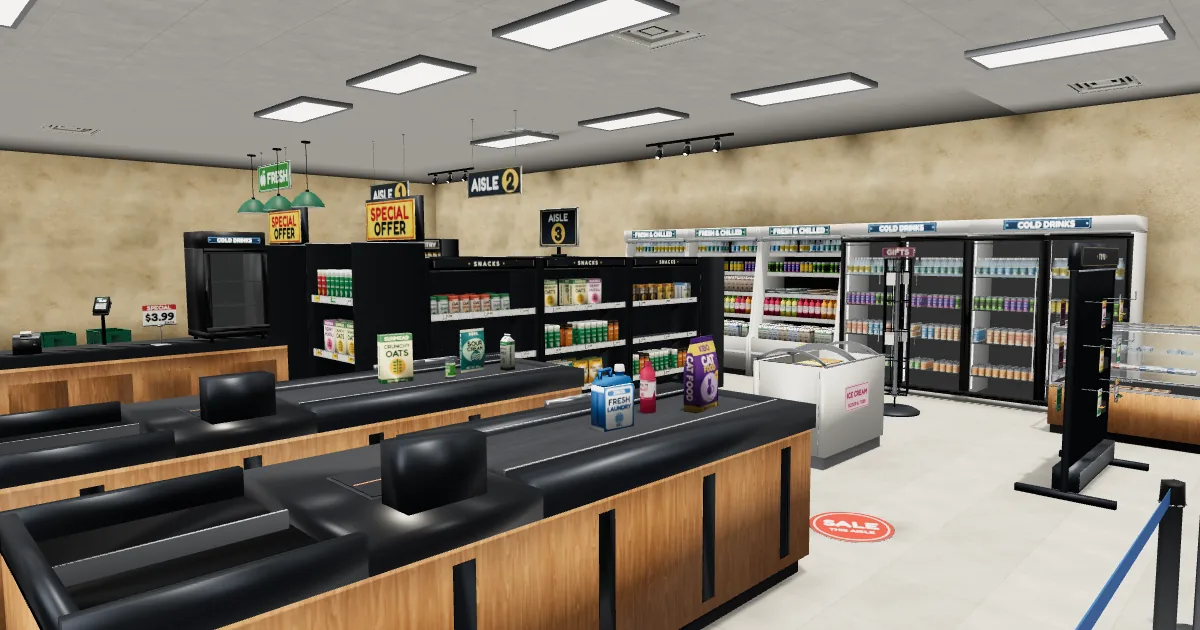
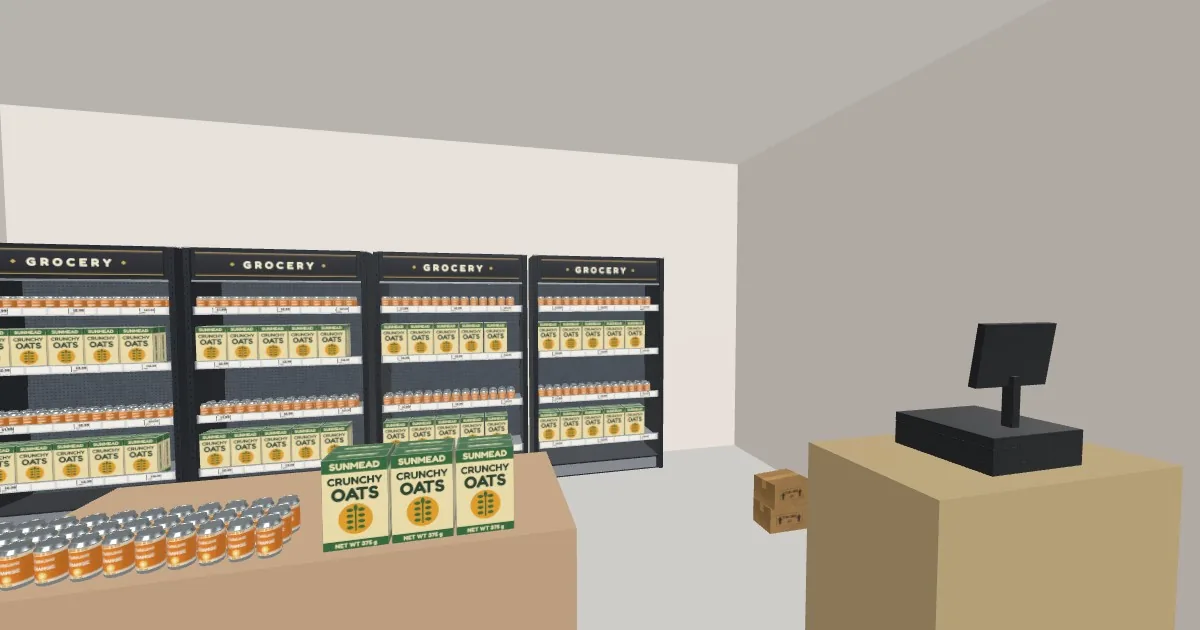
A walkable room in the browser: wall shelves with stocked cans and cereal boxes, an island table, a counter with a till, a few cartons and a doorway. The finished corner shop is 6 x 5 m, 515 objects, one 620 KB file plus a collision list of 17 boxes. Open it and walk around first if you like.
| Tool | Job here | Version we ran |
|---|---|---|
| Claude | writes layout.py, place.py and the runtime from a brief | any coding session |
| Blender | headless: places the props, ray-tests the shelves, exports the GLB | 4.5.10 LTS |
| glTF Transform CLI | one command to bake the GLB for the web | 4.5.1 |
| three.js | loads the GLB, walks the camera, collides with boxes | r170 (0.170.0) |
Free versus paid
| Free (CC0) | Store Simulator Kit (paid) | |
|---|---|---|
| Store models | 6 in the Simulator Kits Sampler: wall shelf, POS till, soda can, cereal box, carton, shelf price tag | 226 assets, 312 GLB files (every product comes in several printed designs and a blank) |
| What you can build | a corner shop like the one above | the supermarket in the video: gondolas, chillers, checkout lanes, produce island, bakery, back room. The demo uses 173 of the 312 files |
| Licence | CC0: commercial use fine, no credit | royalty-free use in your own projects, no reselling the files |
| Price | free | from $14.99 on itch.io |
The free Vuena Free Mega Starter also has eight "Market Fresh" props (produce piles, bread baskets, cheese, a price-clip sign). We did not use them here.
What the files are. The six store props are PBR-textured and light: 44 to 1,284 triangles each, 1 unit = 1 m, pivot at the bottom centre (the wall shelf's pivot is the middle of its back edge, so you can push it against a wall). Our itch.io pages call the kits "realistic PBR"; by triangle count they are low-poly. Both are true: realistic proportions and PBR materials on light meshes.
Get the six free store props
They are in the Simulator Kits Sampler (24 CC0 props, six each from four kits, GLB and FBX). The same six files are in the Free Mega Starter on GitHub under Simulator/Store-Simulator-Kit/GLB.
The brief to Claude
To build a 3D scene with Claude, the video's brief was two lines. The full original prompt was not kept, so this is the brief, condensed, as the video shows it:
Build a walkable supermarket that runs in the browser. Use only models from our Store Simulator Kit.
That is all the video shows. For the corner shop, here is a longer brief we wrote for this guide (not the video's). It spells out the three steps and asks for numbers back after each one:
Build a walkable corner shop that runs in the browser (three.js).
Use only the models listed in manifest.json (names, sizes in metres, pivots,
triangles). Do not invent model names or sizes.

1. layout.py: pure Python, no bpy. A Lay class with add() / box() / stock() / drop().
   Room 6 x 5 x 3 m. Blender axes: x right, y into the room, z up, front = -y.
   Placements are data. Anything that depends on real geometry (items on a shelf
   board, a till on a counter) is a job that Blender resolves later with ray casts.
2. place.py: headless Blender. Place everything, resolve the jobs, export a GLB and
   write the collision boxes for the walker.
3. walk.html: three.js, joystick + drag to look + WASD, simple collision.

After each step tell me: objects placed, slots rejected, triangles, file size.
The asset-manifest trick
Claude has never seen your files. Without a list it will happily write sk_shelf_big or guess that a shelf is two metres wide, and the first you hear of it is a failed import in Blender. So generate a manifest first, hand it over with the brief, and make the layout code refuse any name that is not in it. manifest.py is 21 lines:
# manifest.py - list every model in a folder with its real size, pivot offset and triangle count.
# blender -b --factory-startup -P manifest.py -- <folder with .glb files> <out.json>
import bpy, sys, os, glob, json
from mathutils import Vector

src, out = sys.argv[sys.argv.index('--') + 1:][:2]
rows = {}
for f in sorted(glob.glob(os.path.join(src, '**', '*.glb'), recursive=True)):
    bpy.ops.wm.read_factory_settings(use_empty=True)
    bpy.ops.import_scene.gltf(filepath=f)
    meshes = [o for o in bpy.data.objects if o.type == 'MESH']
    pts = [o.matrix_world @ Vector(c) for o in meshes for c in o.bound_box]
    lo = [min(p[i] for p in pts) for i in range(3)]
    hi = [max(p[i] for p in pts) for i in range(3)]
    rows[os.path.basename(f)[:-4]] = {
        'size_m': {'x': round(hi[0] - lo[0], 3), 'y_depth': round(hi[1] - lo[1], 3), 'z_height': round(hi[2] - lo[2], 3)},
        'min_corner': [round(v, 3) for v in lo],   # pivot is at the bottom centre when x, y are about -/+ half the size and z is 0
        'tris': sum(len(p.vertices) - 2 for o in meshes for p in o.data.polygons),
    }
json.dump(rows, open(out, 'w'), indent=1)
print('MANIFEST', len(rows), 'models ->', out)
Run it with blender -b --factory-startup -P manifest.py -- ./store manifest.json. One entry of the output, as written by the script for the free shelf:
"sk_shelf_wall_120": {
 "size_m": { "x": 1.204, "y_depth": 0.425, "z_height": 1.961 },
 "min_corner": [ -0.602, -0.425, 0.0 ],
 "tris": 1284
}
min_corner is the pivot in disguise: z = 0 means the pivot is on the floor, y from -0.425 to 0 means the shelf's back edge sits on the pivot. The guard that uses the manifest is one line in Lay.add: assert name in MAN. The kit's own layout script has the same guard against its file list.
Blender Python level layout: the layout as data
The idea that carried the whole video is to keep the Blender Python level layout as plain data. This is the top of the paid kit's real layout script (gen/layout_market.py, the store in the video: 172 lines, 3,087 objects once the jobs are resolved), shown unedited:
# gen/layout_market.py of the Store Simulator Kit (paid), lines 12-22, unedited
class Lay:
    def __init__(self): self.P = []; self.J = []
    def add(self, name, x, y, z=0.0, rz=0.0, tag='prop'):
        assert name in MOD, name
        self.P.append(dict(pid=len(self.P), name=name, module=MOD[name], x=round(x, 4), y=round(y, 4), z=round(z, 4), rz=rz, tag=tag)); return len(self.P) - 1
    # jobs (resolved in Blender)
    def stock(self, unit, z, prod, xr, yr, side=0, rows=3, fill=(0.8, 0.95), designs='abc', gap=0.006, run=(2, 4), tol=0.006):
        self.J.append(dict(kind='stock', unit=unit, z=z, prod=prod, xr=xr, yr=yr, side=side, rows=rows, fill=fill, designs=designs, gap=gap, run=run, tol=tol))
    def pile(self, unit, name, c, size, zr, rz_unit=True, aligned=None, spacing=1.08, jitter=0.12):
        self.J.append(dict(kind='pile', unit=unit, name=name, c=c, size=size, zr=zr, aligned=aligned, spacing=spacing, jitter=jitter))
    def drop(self, name, x, y, rz=0.0, tag='prop', z0=2.6): self.J.append(dict(kind='drop', name=name, x=x, y=y, rz=rz, tag=tag, z0=z0))
Three kinds of statement. add puts one model at x, y, z with a rotation and a tag. stock and pile and drop do not place anything yet: they are jobs, "fill this shelf board with that product" or "lower this object until it lands". Blender resolves the jobs later against the real geometry (section 4). That split is the point: Claude can change a number or a product name in one line, and the layout never needs the geometry to be correct by hand.
The corner shop uses the same shape. It is layout.py, 35 lines including Lay, pure Python:
# layout.py - the corner shop as data. Blender axes, metres: x to the right, y into the room (back wall at y = 5), z up, front = -y.
# Pure Python (no bpy): run it, print it and diff it before Blender ever opens.
import json, os
MAN = json.load(open(os.path.join(os.path.dirname(os.path.abspath(__file__)), 'manifest.json')))   # what exists, with real sizes

class Lay:
    def __init__(self): self.P = []; self.J = []                      # P = placed things, J = jobs that Blender resolves with ray casts
    def box(self, name, lo, hi, col, tag='solid'):                    # plain box for walls, floor, counters; origin 0, so local = world
        self.P.append(dict(pid=len(self.P), name=name, box=(lo, hi), col=col, x=0, y=0, z=0, rz=0, tag=tag)); return len(self.P) - 1
    def add(self, name, x, y, z=0.0, rz=0.0, tag='prop'):
        assert name in MAN, name                                       # only models that exist in manifest.json
        self.P.append(dict(pid=len(self.P), name=name, x=x, y=y, z=z, rz=rz, tag=tag)); return len(self.P) - 1
    def stock(self, unit, z, prod, xr, yr, rows=2, gap=0.01):          # fill one shelf board (z above the unit) with prod
        self.J.append(dict(kind='stock', unit=unit, z=z, prod=prod, xr=xr, yr=yr, rows=rows, gap=gap))
    def drop(self, name, x, y, rz=0.0, z0=1.6, tag='prop'):            # lower name from z0 until it lands on whatever is below
        self.J.append(dict(kind='drop', name=name, x=x, y=y, rz=rz, z0=z0, tag=tag))

def build():
    L = Lay(); W, D, H = 6, 5, 3                                       # room 6 x 5 x 3 m, door gap in the front wall at x 4.4 .. 5.6
    L.box('floor', (0, 0, -.05), (W, D, 0), (.6, .58, .55), tag='shell'); L.box('ceiling', (0, 0, H), (W, D, H + .05), (.93, .93, .9), tag='shell')
    for n, lo, hi in (('back', (-.1, D, 0), (W + .1, D + .1, H)), ('left', (-.1, 0, 0), (0, D, H)), ('right', (W, 0, 0), (W + .1, D, H)),
                      ('front_l', (-.1, -.1, 0), (4.4, 0, H)), ('front_r', (5.6, -.1, 0), (W + .1, 0, H)), ('door_top', (4.4, -.1, 2.2), (5.6, 0, H))):
        L.box('wall_' + n, lo, hi, (.86, .82, .74))
    boards = (.291, .691, 1.091, 1.491)                                # shelf board heights, read with a ray scan (section 4)
    for x, y, rz in ((.65, D, 0), (1.9, D, 0), (3.15, D, 0), (4.4, D, 0), (0, 1.75, 90), (0, 3.0, 90)):   # wall shelves: back wall, then left wall turned 90 degrees
        u = L.add('sk_shelf_wall_120', x, y, 0, rz, tag='solid')
        for z, p in zip(boards, ('cereal_l_a', 'can_soda_a', 'cereal_l_a', 'can_soda_a')): L.stock(u, z, 'sk_prod_' + p, (-.56, .56), (-.38, -.02))
    t = L.box('table', (1.9, 2.2, 0), (3.7, 3.0, .8), (.55, .38, .22))  # island: boxes work as stock units too
    L.stock(t, .8, 'sk_prod_can_soda_a', (1.95, 2.8), (2.25, 2.95), rows=3); L.stock(t, .8, 'sk_prod_cereal_l_a', (2.9, 3.65), (2.25, 2.95))
    L.box('counter', (4.8, 1.8, 0), (W, 2.4, .95), (.5, .34, .2)); L.drop('sk_pos_till', 5.4, 2.1, 180)
    for x, y, rz in ((5.4, 3.4, 0), (5.4, 3.4, 8), (5.75, 3.4, -5)): L.drop('sk_carton_s', x, y, rz, 1.0, 'solid')   # cartons by the counter
    return L

if __name__ == '__main__':
    L = build(); print(len(L.P), 'placed,', len(L.J), 'jobs for Blender to resolve')
Run python layout.py and it prints 16 placed, 30 jobs for Blender to resolve: the 16 things placed by hand are the room, the six shelves, the table and the counter. The other 499 objects of the finished shop come from the 30 jobs. Tags are not decoration: solid marks what the walker collides with, and that is how the collision list in section 6 is made.
Placing in Blender headless, and the shelf ray test
Blender runs without a window: blender -b --factory-startup -P place.py -- ./store shop.glb. place.py reads the layout, imports each free GLB once, places linked copies, resolves the jobs and exports. The whole file is 94 lines (below); the part that matters is the ray test.
Find the board heights
The layout says boards are at 0.291, 0.691, 1.091 and 1.491 m. Do not trust a number from a chat: ask the shelf. scan.py fires a ray straight down through the shelf and keeps the surfaces that face up:
# scan.py - find the shelf board heights with rays. blender -b --factory-startup -P scan.py -- <shelf.glb>
import bpy, sys
from mathutils import Vector
bpy.ops.wm.read_factory_settings(use_empty=True); bpy.ops.import_scene.gltf(filepath=sys.argv[sys.argv.index('--') + 1])
bpy.context.view_layer.update(); dg = bpy.context.evaluated_depsgraph_get()
z, tops = 2.5, []
while z > 0:                                                    # a ray straight down through the shelf, surface by surface
    ok, loc, nrm, *_ = bpy.context.scene.ray_cast(dg, Vector((0, -0.2, z)), Vector((0, 0, -1)), distance=z)
    if not ok: break
    if nrm.z > 0.99: tops.append(round(loc.z, 3))               # keep only surfaces that face up: the board tops
    z = loc.z - 0.002                                           # step just below the hit and go on
print('BOARD TOPS', tops)
It prints BOARD TOPS [1.96, 1.491, 1.091, 0.691, 0.291, 0.12]. The four middle values are the boards the layout stocks; 1.96 is the top of the unit and 0.12 is something low in the base that we did not stock.
The ray test
For every slot on a board the script casts five rays straight down, from just above the product's height, at its centre and four corners. The product is placed only if all five rays hit the same shelf, on a surface that faces up, within 6 mm of the board height. The kit's demo uses exactly this idea; the real lines (unedited) are:
# gen/demo_market.py of the Store Simulator Kit (paid), lines 40-47 and 63-66, unedited (the ray test the demo store uses)
    def ray(self, x, y, z, dist):
        ok, loc, nrm, idx, ob, _ = self.sc.ray_cast(self.dg, Vector((x, y, z)), Vector((0, 0, -1)), distance=dist)
        if not ok: return None
        return loc.z, nrm.z, (ob.original if hasattr(ob, 'original') else ob).get('pid')

def foot(cx, cy, ang, W, D, inset=0.003):
    c, s = math.cos(ang), math.sin(ang); pts = [(0, 0)] + [(sx * (W / 2 - inset), sy * (D / 2 - inset)) for sx in (-1, 1) for sy in (-1, 1)]
    return [(cx + u * c - v * s, cy + u * s + v * c) for u, v in pts]
    ...
            def valid(lx, ly):
                wx, wy = at(lx, ly); hs = hits(foot(wx, wy, ang, W, D), z0, H + 0.06)
                if any(h is None or h[2] != u['pid'] or abs(h[0] - zt) > j['tol'] for h in hs): return None
                return max(h[0] for h in hs)
Our version, in place.py:
def ray(dg, x, y, z, dist):                                            # one ray straight down: (hit height, surface normal z, which placed thing)
    ok, loc, nrm, _, ob, _ = sc.ray_cast(dg, Vector((x, y, z)), Vector((0, 0, -1)), distance=dist)
    return (loc.z, nrm.z, (ob.original if hasattr(ob, 'original') else ob).get('pid')) if ok else None
...
hits = [ray(dg, fx, fy, zt + H + .004, H + .06) for fx, fy in foot(wx, wy, a, W, D)]
if all(h and h[2] == u['pid'] and h[1] > .99 and abs(h[0] - zt) < .006 for h in hits):   # all 5 rays hit THIS unit, flat, at board height
    add(j['prod'], wx, wy, max(h[0] for h in hits), u['rz'] + rng.uniform(-1, 1), 'stock')
else: stats['rejected'] += 1
Because every item lands at the height the rays found, nothing floats and nothing sinks. A slot that does not pass is skipped and counted. The run prints one line, and for the corner shop it reads:
PLACED 515 things; {'stock': 495, 'rejected': 0, 'drop': 4} ; triangles 160938 ; GLB 2.68 MB -> shop.glbAll of place.py (94 lines)
# place.py - turn layout.build() into a scene and a GLB. Headless:
#   blender -b --factory-startup -P place.py -- <folder with the free .glb files> <out.glb>
import bpy, sys, os, glob, math, random, json
from mathutils import Vector
sys.path.insert(0, os.path.dirname(os.path.abspath(__file__)))
import layout

SRC, OUT = sys.argv[sys.argv.index('--') + 1:][:2]
FILES = {os.path.basename(f)[:-4]: f for f in glob.glob(os.path.join(SRC, '**', '*.glb'), recursive=True)}
rng = random.Random(2026)                                              # same seed, same shop every run
bpy.ops.wm.read_factory_settings(use_empty=True); sc = bpy.context.scene
tmpl, dims, mats = {}, {}, {}

def template(name):                                                    # import a GLB once; copies share its mesh and material data
    if name in tmpl: return tmpl[name]
    before = set(bpy.data.objects); bpy.ops.import_scene.gltf(filepath=FILES[name])
    new = [o for o in bpy.data.objects if o not in before]; root = [o for o in new if o.parent is None][0]
    for o in new:
        for c in list(o.users_collection): c.objects.unlink(o)       # the template itself stays out of the scene
    bpy.context.view_layer.update()
    pts = [root.matrix_world.inverted() @ (o.matrix_world @ Vector(c)) for o in new if o.type == 'MESH' for c in o.bound_box]
    dims[name] = [max(p[i] for p in pts) - min(p[i] for p in pts) for i in range(3)]   # W, D, H
    tmpl[name] = root; return root

def make_box(p):
    (x0, y0, z0), (x1, y1, z1) = p['box']
    v = [(x, y, z) for z in (z0, z1) for y in (y0, y1) for x in (x0, x1)]
    me = bpy.data.meshes.new(p['name']); me.from_pydata(v, [], [(0, 2, 3, 1), (4, 5, 7, 6), (0, 1, 5, 4), (2, 6, 7, 3), (0, 4, 6, 2), (1, 3, 7, 5)])
    key = tuple(p['col'])
    if key not in mats:
        m = bpy.data.materials.new('flat%d' % len(mats)); m.use_nodes = True
        b = m.node_tree.nodes['Principled BSDF']; b.inputs['Base Color'].default_value = (*key, 1); b.inputs['Roughness'].default_value = .9; mats[key] = m
    me.materials.append(mats[key]); o = bpy.data.objects.new(p['name'], me); sc.collection.objects.link(o); return o

def place(p):
    if 'box' in p: o = make_box(p)
    else:
        def dup(src, parent=None):
            c = src.copy(); sc.collection.objects.link(c); c.parent = parent
            for ch in src.children: dup(ch, c)
            return c
        o = dup(template(p['name'])); o.location = (p['x'], p['y'], p['z'])
        o.rotation_mode = 'XYZ'; o.rotation_euler = (0, 0, math.radians(p['rz']))   # glTF import leaves quaternion mode on: Euler is ignored until you switch
    o.name = p['tag'] + '_' + p['name']                                  # the tag becomes the node name prefix (solid_, stock_, drop_ ...)
    for c in [o] + list(o.children_recursive): c['pid'] = p['pid']
    return o

def refresh():
    bpy.context.view_layer.update(); return bpy.context.evaluated_depsgraph_get()

def ray(dg, x, y, z, dist):                                            # one ray straight down: (hit height, surface normal z, which placed thing)
    ok, loc, nrm, _, ob, _ = sc.ray_cast(dg, Vector((x, y, z)), Vector((0, 0, -1)), distance=dist)
    return (loc.z, nrm.z, (ob.original if hasattr(ob, 'original') else ob).get('pid')) if ok else None

def foot(cx, cy, ang, W, D, inset=.003):                               # centre + 4 corners of the footprint, turned by ang
    c, s = math.cos(ang), math.sin(ang)
    return [(cx + u * c - v * s, cy + u * s + v * c) for u, v in [(0, 0)] + [(a * (W / 2 - inset), b * (D / 2 - inset)) for a in (-1, 1) for b in (-1, 1)]]

L = layout.build(); P = list(L.P); stats = dict(stock=0, rejected=0, drop=0)
def add(name, x, y, z, rz, tag):
    p = dict(pid=len(P), name=name, x=x, y=y, z=z, rz=rz, tag=tag); P.append(p); place(p); return p
for p in P: place(p)
dg = refresh()
for j in L.J:
    if j['kind'] == 'stock':
        u = P[j['unit']]; a = math.radians(u['rz']); ca, sa = math.cos(a), math.sin(a)
        template(j['prod']); W, D, H = dims[j['prod']]; zt = u['z'] + j['z']      # zt = where the board's top surface should be
        x = j['xr'][0] + W / 2
        while x + W / 2 <= j['xr'][1] + 1e-6:
            ly = j['yr'][0] + D / 2
            for row in range(j['rows']):
                wx, wy = u['x'] + x * ca - ly * sa, u['y'] + x * sa + ly * ca     # unit-local -> world
                hits = [ray(dg, fx, fy, zt + H + .004, H + .06) for fx, fy in foot(wx, wy, a, W, D)]
                if all(h and h[2] == u['pid'] and h[1] > .99 and abs(h[0] - zt) < .006 for h in hits):   # all 5 rays hit THIS unit, flat, at board height
                    add(j['prod'], wx, wy, max(h[0] for h in hits), u['rz'] + rng.uniform(-1, 1), 'stock'); stats['stock'] += 1
                else: stats['rejected'] += 1
                ly += D + .004
            x += W + j['gap']
        dg = refresh()
    elif j['kind'] == 'drop':
        template(j['name']); W, D, H = dims[j['name']]
        h = [r for r in (ray(dg, fx, fy, j['z0'], j['z0'] + .1) for fx, fy in foot(j['x'], j['y'], math.radians(j['rz']), W, D, .01)) if r]
        add(j['name'], j['x'], j['y'], max(r[0] for r in h) if h else 0.0, j['rz'], j['tag']); stats['drop'] += 1; dg = refresh()

walls = []                                                             # what the runtime collides with: every top-level 'solid_' thing as one box
for o in sc.objects:
    if o.parent is None and o.name.startswith('solid_'):
        pts = [o.matrix_world @ Vector(c) for m in [o] + list(o.children_recursive) if m.type == 'MESH' for c in m.bound_box]
        lo = [min(p[i] for p in pts) for i in range(3)]; hi = [max(p[i] for p in pts) for i in range(3)]
        walls.append([round(v, 3) for v in (lo[0], -hi[1], hi[0], -lo[1], lo[2])])   # minX, minZ, maxX, maxZ, bottom, in three.js axes (z = -y)
json.dump(walls, open(OUT[:-4] + '.walls.json', 'w'))
objs = [o for o in sc.objects]; tris = sum(len(p.vertices) - 2 for o in objs if o.type == 'MESH' for p in o.data.polygons)
bpy.ops.export_scene.gltf(filepath=OUT, export_format='GLB', export_apply=True)
print('PLACED', len(P), 'things;', stats, '; triangles', tris, '; GLB', round(os.path.getsize(OUT) / 1e6, 2), 'MB ->', OUT)
The same run also writes shop.walls.json: one box [minX, minZ, maxX, maxZ, bottom] for every top-level solid thing, already in three.js axes. That file is the collision data for section 6.
Baking for the web, with the real numbers
The raw export is 160,938 triangles and 2.68 MB, which is fine for a desktop but wasteful. One command from the glTF Transform CLI bakes it for the web:
npx @gltf-transform/cli optimize shop.glb shop.web.glb --compress meshopt --texture-compress webp| Video store (paid kit) | Corner shop (free props) | |
|---|---|---|
| Objects placed | 3,087 | 515 |
| Triangles | 1,115,136 to 291,442 | 160,938 to 158,686 |
| File size | 3.5 MB (whole demo zip) | 2.68 MB to 620 KB |
| Scene nodes | 3,087 baked into 22 meshes | 516 to 7 (instancing + joining) |
Video store: from the demo's bake log; the 22 merged meshes it wrote hold 304,226 triangles after the merge. Corner shop: measured on the files in this guide.
The two columns are not the same technique. The video's store needs a heavier bake: the whole scene is merged into 22 meshes, decimated, with ambient occlusion baked into the vertices and one 2048 x 3584 colour atlas, packed into a single custom binary (2.58 MB, a bake of about 50 seconds). That is custom code and not part of this guide. The corner shop is small and its props are already light, so the command above barely touches the triangles (160,938 to 158,686) and saves its size mostly by converting the textures to WebP and instancing the repeated cans and boxes. If you move to a store ten times this size, expect to need decimation and merging as well.
Instancing and joining erase the node names, which is why collision does not read names from the GLB: Blender already wrote shop.walls.json.
Want the whole store?
The Store Simulator Kit has 226 assets (312 GLB files with every product design and a blank), a Godot 4 demo and a Blender file. The store in the video uses 173 of the files. From $14.99 on itch.io; the price shown there is final.
See the Store Simulator Kit on itch.ioThe three.js runtime starter
One file, 74 lines: loads the baked GLB, a joystick on touch screens, drag to look, WASD on a keyboard and simple collision. Put walk.html, shop.web.glb and shop.walls.json in one folder and serve it (python -m http.server is enough; a module and a fetch will not work from a double-clicked file). three.js comes from jsDelivr, so you need to be online.
<!doctype html>
<meta charset="utf-8">
<meta name="viewport" content="width=device-width,initial-scale=1,viewport-fit=cover">
<title>Walkable shop starter</title>
<style>
  html, body { margin: 0; height: 100%; overflow: hidden; background: #cfd8e0; touch-action: none; user-select: none; font: 600 13px system-ui; }
  canvas { display: block; width: 100%; height: 100%; }
  #stick { position: fixed; left: 24px; bottom: 28px; width: 120px; height: 120px; border-radius: 50%; border: 2px solid #fff9; display: none; }
  #knob { position: absolute; left: 36px; top: 36px; width: 48px; height: 48px; border-radius: 50%; background: #fffc; }
  .hint { position: fixed; bottom: 160px; color: #fff; text-shadow: 0 1px 3px #000; pointer-events: none; display: none; }
  #hmove { left: 24px; } #hlook { right: 24px; }
  body.touch #stick { display: block; }
  body.touch:not(.started) .hint { display: block; }                    /* one rule per state, so "started" really hides the hints */
</style>
<canvas id="c"></canvas><div id="stick"><div id="knob"></div></div><div class="hint" id="hmove">Drag to walk</div><div class="hint" id="hlook">Drag to look</div>
<script type="importmap">{ "imports": { "three": "https://cdn.jsdelivr.net/npm/three@0.170.0/build/three.module.js", "three/addons/": "https://cdn.jsdelivr.net/npm/three@0.170.0/examples/jsm/" } }</script>
<script type="module">
import * as THREE from 'three';
import { GLTFLoader } from 'three/addons/loaders/GLTFLoader.js';
import { MeshoptDecoder } from 'three/addons/libs/meshopt_decoder.module.js';
import { RoomEnvironment } from 'three/addons/environments/RoomEnvironment.js';

const EYE = 1.6, R = 0.25, SPEED = 2.2;                                  // metres, metres, metres per second
if (matchMedia('(pointer: coarse)').matches) document.body.classList.add('touch');
const cv = document.getElementById('c'), knob = document.getElementById('knob'), stick = document.getElementById('stick');
const renderer = new THREE.WebGLRenderer({ canvas: cv, antialias: true });
renderer.setPixelRatio(Math.min(devicePixelRatio, 2));
const scene = new THREE.Scene(); scene.background = new THREE.Color(0xcfd8e0);
scene.environment = new THREE.PMREMGenerator(renderer).fromScene(new RoomEnvironment(), 0.04).texture;
scene.environmentIntensity = 0.5; scene.add(new THREE.HemisphereLight(0xffffff, 0xd8d0c4, 0.7));
const cam = new THREE.PerspectiveCamera(70, 1, 0.1, 60); window.cam = cam;   // window.cam: poke at it from the console
const pos = new THREE.Vector3(4.3, 0, -0.7); let yaw = 0.35, pitch = 0;   // just inside the door, turned a little towards the shelves (-z is into the shop)

let walls = [];                                                          // boxes written by place.py: [minX, minZ, maxX, maxZ, bottom]
const loader = new GLTFLoader().setMeshoptDecoder(MeshoptDecoder);
Promise.all([loader.loadAsync('shop.web.glb'), fetch('shop.walls.json').then(r => r.json())]).then(([gltf, w]) => {
  scene.add(gltf.scene); walls = w.filter(b => b[4] < 1.0);               // a lintel above head height does not block the door
});
const blocked = (x, z) => walls.some(b => x > b[0] - R && x < b[2] + R && z > b[1] - R && z < b[3] + R);
function move(dx, dz) {                                                  // slide along walls: try each axis on its own
  if (!blocked(pos.x + dx, pos.z)) pos.x += dx;
  if (!blocked(pos.x, pos.z + dz)) pos.z += dz;
  pos.z = Math.min(pos.z, -0.3);                                         // the door gap is open: do not walk out into the void
}

const keys = {}, mv = new THREE.Vector2(); let look = null, drive = null;
addEventListener('keydown', e => keys[e.code] = 1); addEventListener('keyup', e => keys[e.code] = 0);
cv.addEventListener('pointerdown', e => {
  document.body.classList.add('started'); cv.setPointerCapture(e.pointerId);
  if (e.pointerType === 'touch' && e.clientX < innerWidth * 0.4) drive = e.pointerId; else look = { id: e.pointerId, x: e.clientX, y: e.clientY };
});
cv.addEventListener('pointermove', e => {
  if (drive === e.pointerId) {                                           // joystick: finger offset from the ring centre, 50 px = full speed
    const r = stick.getBoundingClientRect(); mv.set(e.clientX - r.left - 60, e.clientY - r.top - 60).divideScalar(50);
    if (mv.length() > 1) mv.normalize(); knob.style.transform = `translate(${mv.x * 40}px,${mv.y * 40}px)`;
  } else if (look && look.id === e.pointerId) {                          // drag to look
    yaw -= (e.clientX - look.x) * 0.005; pitch = THREE.MathUtils.clamp(pitch - (e.clientY - look.y) * 0.005, -1.2, 1.2); look.x = e.clientX; look.y = e.clientY;
  }
});
const end = e => { if (look && look.id === e.pointerId) look = null; if (drive === e.pointerId) { drive = null; mv.set(0, 0); knob.style.transform = ''; } };
cv.addEventListener('pointerup', end); cv.addEventListener('pointercancel', end);

const fit = () => { renderer.setSize(innerWidth, innerHeight, false); cam.aspect = innerWidth / innerHeight; cam.updateProjectionMatrix(); };
addEventListener('resize', fit); fit();
const clock = new THREE.Clock();
renderer.setAnimationLoop(() => {
  const dt = Math.min(clock.getDelta(), 0.05);
  const f = (keys.KeyW || keys.ArrowUp ? 1 : 0) - (keys.KeyS || keys.ArrowDown ? 1 : 0) - mv.y;     // forward / back
  const s = (keys.KeyD || keys.ArrowRight ? 1 : 0) - (keys.KeyA || keys.ArrowLeft ? 1 : 0) + mv.x;  // strafe
  const v = SPEED * dt * (keys.ShiftLeft ? 1.8 : 1);
  move((-Math.sin(yaw) * f + Math.cos(yaw) * s) * v, (-Math.cos(yaw) * f - Math.sin(yaw) * s) * v);
  cam.position.set(pos.x, EYE, pos.z); cam.rotation.set(pitch, yaw, 0, 'YXZ'); renderer.render(scene, cam);
});
</script>
How it works, in order:
- Load.
GLTFLoaderwith the meshopt decoder, because the baked file is meshopt-compressed. A neutral environment map and a hemisphere light are enough for PBR props. - Collision. The player is a circle of 0.25 m. Each box from
shop.walls.jsonis grown by that radius and tested as a point. Movement slides: X and Z are tried on their own, so you glide along a shelf instead of sticking to it. The lintel above the door has its bottom at 2.2 m, so boxes that start above 1 m are ignored. A last line stops you walking out through the open door. - Input. Keyboard WASD or arrows, Shift to run. On touch, a pointer inside the left 40% of the screen drives the joystick ring; any other pointer drags the view. Pointer events cover mouse and touch with one code path.
- Hints. The "Drag to walk" and "Drag to look" labels are shown for touch screens until the first pointer goes down. They are one rule with
:not(.started)on purpose; section 7 says why.
Run exactly this file on the corner shop, or download the baked shop (620 KB).
What was tested. Desktop Chrome at 1200 x 630: the shop loads and renders with no console errors. Held W against the back shelves, the left shelves, the island table, the counter and the open door: each stops within a few centimetres of the expected distance. Chrome's 375 x 812 mobile emulation: scripted pointer events moved the joystick, turned the view and hid the hints. Not tested: a real phone, Safari, any slow device.
What broke
Flickering labels (z-fighting)
While strafing along a stocked shelf in the demo, the product labels flickered. Two faces were sitting in the same plane (labels 0.3 to 0.8 mm proud of bottles and cans, trims flush with panels), and the depth buffer could not decide which one is in front. The fix was to move one face of every such pair so the planes end up 2 mm apart, in the generators of the kits, before export. It shipped in kit v2.3. In our flicker test (six views of each model), a store gondola went from 1,829 flickering pixels to 14. The detector flagged 85 of the 270 store-kit models before the fix and 22 after, so it is better, not perfect. We did not re-run the detector on the six free props for this guide; the shop looked clean in the frames we looked at, which is a weaker claim.
The hints that never went away
On touch screens the demo's "Drag to walk" and "Drag to look" labels never hid. The rule that shows them for touch screens, body.touch.loaded .thint, has higher specificity than the rule that hides them once play starts, body.started .thint, so the hiding rule lost every time. The fix is one line: body.touch.loaded:not(.started) .thint. It is live in the demo on this site since 13 November 2026. The starter above uses the same pattern from the start.
Two more, while writing this guide
- 116 rejected slots on the first run. The shelves on the left wall had not turned. Blender's glTF importer leaves objects in quaternion rotation mode, so setting
rotation_eulerdoes nothing until you setrotation_mode = 'XYZ'. The ray test noticed before we did: its rays hit empty air. It is now one extra line inplace. - 20 rejected slots on the second run. After the rotation fix, cereal boxes on the top boards of the left shelves were refused. A box is 0.29 m tall and there is only 0.23 m between the top board and the shelf above it, so the rays hit the underside of the shelf. We changed which product goes on which board.
Not tested
Safari, iPhones, any real Android phone, and anything older than a recent desktop Chrome. The video's demo was measured in headless Chrome on a desktop GPU: 1.2 s to load locally, 3.7 s throttled to 10 Mbit/s, about 75 fps; on a 390 x 844 phone emulation with a 4x CPU slowdown, 2.2 s and about 75 fps. Those say nothing about a real phone.
Limits, FAQ and licence
This is not a game. You can walk around. You cannot sell anything: no checkout, no stock, no money, no customers. There is no jumping, gravity or stairs, and collision is boxes only. The demo is a good start for a game, not a game.
Questions
Can I finish this with only free files?
Yes. The corner shop uses six free CC0 store props (wall shelf, till, soda can, cereal box, carton, shelf price tag) plus plain boxes that layout.py makes for the walls, floor, counter and table. Nothing else.
Do I have to use Claude?
No. Any coding assistant works, or your own hands. What matters is the three habits: a manifest of what exists, a layout kept as data, and a ray test before anything counts as placed. The scripts here were written with Claude and run by us before this page went up.
Why place the props in Blender and not in three.js?
Blender gives you ray casts against the real meshes and one place to look at the result before you ship. You could do the same with a three.js Raycaster. We used Blender because the kit's own demo scenes are built there.
Will it run on phones?
The starter is built for touch (joystick, drag to look) and was tested in Chrome's 375 px mobile emulation with scripted pointer events. A real phone and Safari were never tried.
Can I use the corner shop GLB in my own game?
Yes. It is made only from CC0 props and plain boxes, so use it however you like, no credit needed. It is baked for the web (meshopt compression, WebP textures, instanced meshes), so it is meant to be loaded, not edited. To change it, change layout.py and run it again.
Is the store in the video free?
No. Its models come from the paid Store Simulator Kit, and the baked demo scene on this site is a preview only (the LICENSE.txt next to it says so). The six free props are CC0.
Licence
The six free store props are CC0 1.0: commercial use fine, no credit, no permission needed. The code on this page is yours to copy and use, no credit needed. The excerpts of the paid kit's scripts are shown to explain the method, not to be reused as a kit. The baked demo store scene on this site is a preview and is not licensed for use. The models are made with our own procedural Blender code, written with AI help; the meshes and textures are not AI-generated. The code in this guide was written with Claude and run by us before it was published.
Start with the free files
Six store props are enough for the corner shop. If you want the supermarket from the video, the kit is on itch.io.